The Control Room: Panel
Thanks to this application, which will be the primary digital tool of your project management office, you will have the opportunity to access and edit all the data you store with PROYS. Thanks to new generation technologies, it does not require downloading and works efficiently on every device connected to the internet.
Featured Features
Here Are The Tools You Are Looking For
Developed for construction beyond the limits of Excel.

Excel Integration
The use of the Microsoft Excel application will be widespread in the industry for a while longer, as it has been for the past 20 years, for reading large data and making calculations. For this reason, Excel tools have been added to the Panel application.
You can download data as tables in XLSX or CSV format. Thanks to features compatible with Excel's Power Query feature, you do not have to waste time downloading data every time it is updated.

Media Management
With the Panel, you can not only access the photos kept in the system but also edit their metadata.

Translation and Language Options
Is more than one language spoken in your project? You can add the translation of the content you entered by uploading an Excel file.

Quick Start
You can access it from everywhere with a single address from your tablet or computer browser without downloading.

Auto. Notifications
Important developments in your project will reach you instantly via e-mail. Thus, informing the relevant people will not be interrupted.
Your Corporate Memory
Take Control of Your Data
Make corporate settings to collect the information required for project management according to your company structure.
You will have an area where you can define production types as a company. You will be able to keep it under control thanks to limitations you set while entering contract scopes.
Production Control Features↗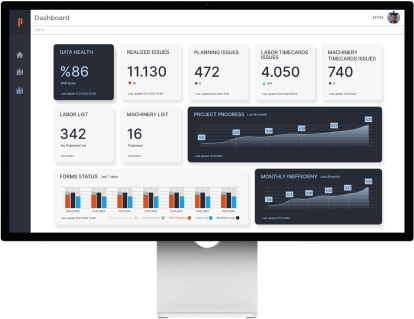
Open a separate record for every employee who has worked for your company. Everything has been thought of for a clean database filled with personnel who have the positions you determine as an institution.
Employee Timecard Tracking Features↗
You can open separate records for each machine used in your projects. Prepare a dataset full of machines associated with machine types you determine as an institution and having special details.
Machine Equipment Management Features↗
Keep records of subcontractors you work with and develop your corporate memory. Compare the performance of companies in different projects. Learn from the past. Limit the companies in your projects.
Subcontractor Management Features↗
Digital Forms
Manage Forms on Field Personnel
You will find special screens in the Panel to view the status of forms automatically generated according to your organizational structure. You can view who is clogging the information flow and what information comes from the field. You can change the user automatically assigned to fill out the form.

Determine Responsibilities
Define the information that PROYS users in the field need to send routinely in the system. Edit as changes occur.

Review Incoming Information
You can browse the content of the data provided as the forms are completed. Attempts to change who sent what information are unchangeable and permanently recorded.
-

Adding
-

Viewing
-

Editing
-

Deleting
Data Health Center
Constantly Monitoring Your Data in the Background
With Panel, you will have an advanced automation mechanism. While increasing your data-driven decision-making capabilities, we also attach importance to the accuracy of your analyzes. Your complex and interdependent data will be constantly audited by Panel and you will be warned when necessary.